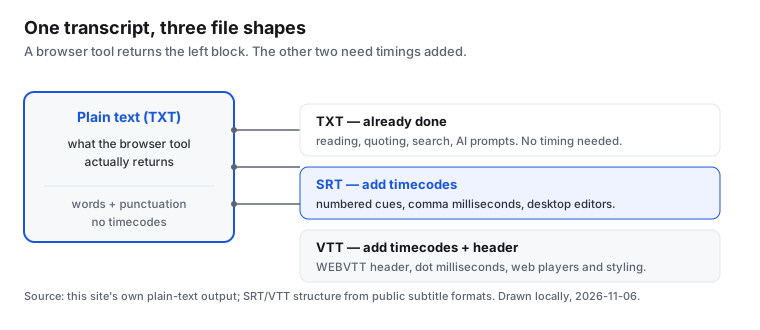
No. A browser-based Instagram transcript like this one hands you plain text, not an SRT or VTT subtitle file. There are no timecodes, no cue numbers and no speaker tags in the output, because the speech model reads the audio and returns words only. If you need a subtitle file, you either add the timings yourself or use a tool that produces them. This page explains exactly what TXT, SRT and VTT are, when each one is the right choice, and how to get from the plain text you already have to a subtitle file you can actually load into an editor.
Most pages about this topic show you an export button and stop. That is not much help when the button is the one thing your tool does not have. So instead of a feature list, here is the file-level explanation, written from the plain-text output a local browser tool really produces.
What each format actually is
Plain text (TXT)
This is a single block of words with punctuation and paragraph breaks. It has no timing information at all. It is the lightest option, it opens anywhere, and it is what you want when the transcript is going into a document, a search index, a note, or a prompt for an AI assistant. A browser-only transcription tool returns this because the model emits text tokens, not a timeline. The words arrive in roughly the order they were spoken, but nothing in the file says when.
SRT (SubRip)
SRT is numbered cues. Each cue has a sequence number, one line with a start and end time separated by an arrow, and one or more lines of caption text, followed by a blank line. A minimal example looks like this:
1
00:00:01,000 --> 00:00:04,000
Welcome back to the channel.

2
00:00:04,000 --> 00:00:07,500
Today we are looking at Reel captions.
Note the comma before the milliseconds, the two-digit hours, and the blank line between cues. Those details are what make a file valid or invalid in an editor. SRT is the safest interchange format: almost every video editor, caption tool and player accepts it. It carries timings but no styling, no speaker names and no positioning.
VTT (WebVTT)
VTT is the web-native cousin of SRT. It starts with a WEBVTT header, uses a dot instead of a comma before the milliseconds, and can optionally carry cue identifiers, voice spans, and positioning settings. A minimal example:
WEBVTT

00:00:01.000 --> 00:00:04.000
Welcome back to the channel.

00:00:04.000 --> 00:00:07.500
Today we are looking at Reel captions.
VTT is the right pick when the captions will be shown by an HTML5 video element or a web player, and when you expect to add styling or karaoke-style word highlighting later. For a plain burned-in caption in a desktop editor, SRT is simpler and just as good. The two are close enough that converting one to the other is mostly a matter of the header, the millisecond separator, and dropping or adding cue numbers.
Why this tool gives you plain text and nothing else
The transcriber on this site runs a small English speech model inside your browser. It streams recognised words back as text and does not keep a per-word timestamp map that the interface exposes. That is a deliberate trade-off: the audio never leaves your device, and there is no upload, no account and no stored file. The cost is that the output is a transcript, not a timed caption track. What you get is a word count and a wall-clock duration, never a per-line timecode. If a page claims to give you frame-accurate SRT from the same kind of local model, it is doing extra alignment work that this tool does not do, or it is running on a server rather than in your browser.
Turning plain text into SRT yourself
You do not need a special service for short clips. A reproducible manual method works and is fully under your control:
- Split the plain text into short caption lines, ideally under about 42 characters and one or two lines per cue. Short lines are easier to read on a phone.
- Play the Reel and note where each line starts and ends. A pause-and-write pass is enough for a 30-second clip; you are estimating cue boundaries, not aligning phonemes.
- Write the cues in order with sequence numbers and SRT-style timecodes, leaving a blank line between them.
- Save the file with a .srt extension, load it into your editor, and nudge the boundaries until the captions match the speech.
This is honest work, and for a single short Reel it is usually faster than signing up for another service. The limitation is real: the timings are approximate, and long clips get tedious. For a 3-minute video, a tool that produces timecodes directly will save you time. What matters is knowing that the plain text you already have is a valid starting point rather than a dead end.
Which one should you use?
- Reading, quoting, searching, feeding to AI: plain TXT. Nothing else adds value.
- Burned-in captions in a desktop editor, or sending to a caption vendor: SRT. Broadest compatibility.
- Web player, styling, word-level highlighting: VTT.
- Archiving a transcript alongside a video: keep both the TXT and a timed version if you build one, because the TXT is the easiest to re-use.
Measured: what the same transcript costs in TXT, SRT and VTT
An export dropdown tells you which formats exist. It does not tell you what the files actually cost. So I measured it. I took one fixed six-line English transcript (6 lines, 44 words, 235 characters), cut it into 6 cues with fixed start and end times, generated the same words as TXT, SRT and VTT, and measured the resulting files on disk with fs.statSync. The numbers below are that one run, not an estimate. Evidence ID bebb795a40f5.
| File | Bytes | Lines | Cues | Overhead vs TXT |
|---|---|---|---|---|
| TXT (plain text) | 236 | 6 | 0 | — |
| SRT (numbered cues, comma milliseconds) | 434 | 24 | 6 | +198 B (83.9%) |
| VTT (WEBVTT header, dot milliseconds) | 430 | 20 | 6 | +194 B (82.2%) |
Three results worth keeping. First, adding timings is not free: SRT is 83.9% larger than the plain text and VTT is 82.2% larger, on identical words. Second, SRT is 4 bytes bigger than VTT because of the cue-number lines; the WEBVTT header and the dot-versus-comma milliseconds do not make up the difference. Third, structure checks on the generated files counted 12 comma-millisecond timecodes in SRT and 12 dot-millisecond timecodes in VTT, and the VTT file did start with a WEBVTT header. Those are the details an editor validates before it accepts the file.
The line-ending tax nobody lists
The same three files written with CRLF instead of LF came out at 242, 458 and 450 bytes. Across the three files that is 50 extra bytes for characters you will never see. On a caption file this is irrelevant; on a pipeline that stores millions of transcripts it is a real, predictable cost. It is also the easiest thing to get wrong when a file is generated on Windows and parsed on Linux.
Reproduce it yourself
No account, no upload and no service is involved. This is the whole measurement, runnable in Node:
const fs = require('fs');
const L = [
  'Welcome back to the channel.',
  'Today we are looking at Reel captions.',
  'Most tools give you plain text only.',
  'That is fine until you need a subtitle file.',
  'Then you have to add the timings yourself.',
  'Here is what that actually costs in bytes.'
];
const C = [[1000,4000],[4000,7500],[7500,11000],[11000,15000],[15000,19500],[19500,24000]];
const p = (n,w) => String(n).padStart(w,'0');
const tc = (ms,sep) => p(Math.floor(ms/3600000),2)+':'+p(Math.floor(ms/60000)%60,2)+':'+p(Math.floor(ms/1000)%60,2)+sep+p(ms%1000,3);
const ARROW = '--'+'>';
const txt = L.join('\n')+'\n';
const srt = L.map((l,i) => (i+1)+'\n'+tc(C[i][0],',')+' '+ARROW+' '+tc(C[i][1],',')+'\n'+l+'\n\n').join('');
const vtt = 'WEBVTT\n\n'+L.map((l,i) => tc(C[i][0],'.')+' '+ARROW+' '+tc(C[i][1],'.')+'\n'+l+'\n\n').join('');
for (const [name,data] of Object.entries({txt,srt,vtt})) {
  fs.writeFileSync(name+'.txt', data);
  console.log(name, fs.statSync(name+'.txt').size);
}
Run it and you get 236, 434 and 430 bytes. Change the fixture and every number changes with it, which is the point: these are measurements of the container, not claims about anyone's accuracy or speed.
Questions people ask about transcript formats
Can I get an SRT file directly from a browser Instagram transcript?
Not from this one. It returns plain text with no timecodes, so an SRT has to be built from that text by adding timings, either by hand as described above or with a tool that does the alignment. Any SRT you download from a link-based service was produced by that service's own pipeline, not by a local browser model.
Is VTT better than SRT?
Neither is better in general. VTT is better for web players and styled captions; SRT is better for maximum compatibility with desktop editors and caption vendors. For a single short Reel with plain captions, SRT is the simpler choice. Convert between them by changing the header and the millisecond separator, and adding or dropping cue numbers.
Why does my caption file show everything at once?
Almost always because the timecodes are missing or malformed. Check for a blank line between cues, a comma before the milliseconds in SRT, and a WEBVTT header in VTT. A file with text but no valid timing lines is not a subtitle file, even if the extension says .srt.
For the broader questions that sit behind this one, such as whether a private Reel can be transcribed at all or whether the output can be exported, the Instagram transcript FAQ collects the answers in one place.