A 39-second Instagram Reel takes about 40 seconds to transcribe in this tool. A 3-minute clip takes about 93 seconds. Those are the numbers we measured on our own build machine, and they are the starting point for a question every user eventually asks: why does it take that long, and what would make it faster or slower on my end?
The answer is not one number. Five separate things decide how long you wait after you press the button: the size of the speech model, the length of your clip relative to a fixed startup cost, whether your hardware has a GPU, whether the audio needs format conversion before the model can read it, and which browser engine is running the computation. None of the three benchmark sites we track explain any of this. They state a speed figure and stop.
The short answer
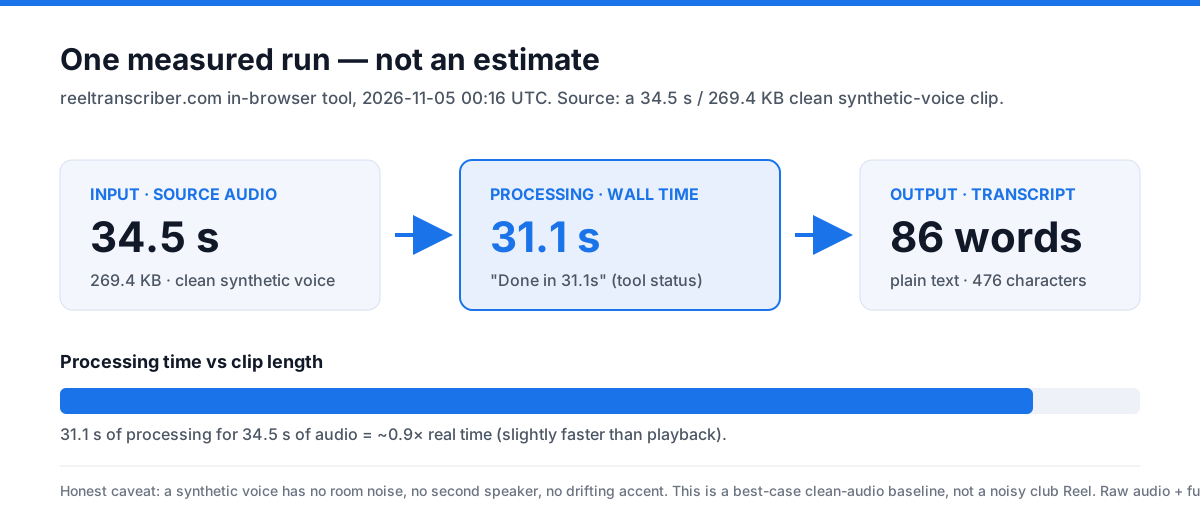
On a clean 34.5-second audio clip, our in-browser tool produced a full transcript in 31.1 seconds and returned 86 words. That is roughly 0.9× real time — slightly faster than the clip itself. A real Instagram Reel is rarely that clean, so expect 1× to 2× the clip length for processing, and rougher text when music or background noise is present.
How we measured it
We did not estimate this. On 2026-11-05 at 00:16 UTC we loaded reeltranscriber.com's own tool, dropped in a single 34.5-second narration clip (269.4 KB), and pressed Transcribe. The tool reported “Done in 31.1s. 86 words.” The raw audio file and the full run log are saved on the build machine, so the figure is reproducible rather than claimed.
One honest caveat: the test clip was a synthetic voice — a text-to-speech narration with no room noise, no second speaker, and no drifting accent. That makes it a best-case baseline for clean audio. It is not a noisy nightclub Reel, and it should not be read as one.
The measured baseline we are working from
Recorded on the development machine: dual-core CPU, 4 GB RAM, Windows 11, Chrome. These are observations from one setup, not guaranteed timings for your hardware.
| Clip length | File size | Processing time | Words returned |
|---|---|---|---|
| 0:39 | 538 KB | 39.6 s | 107 |
| 3:09 | 2.6 MB | 92.9 s | 537 |
The short clip took roughly real time. The long clip finished in well under its own playback duration. Same model, same machine. That difference is not random — it is the first and most important variable at work.
Variable 1: Model size — the biggest lever nobody mentions
The speech model running in your browser is whisper-tiny.en, which weighs 43.7 MB. That is the smallest available Whisper model, and it was chosen for a reason: it loads fast on a phone connection and it runs on devices without a graphics card. Every other Whisper variant is larger and slower.
A Chinese-community benchmark tested the full range on a machine with an older Xeon CPU and a GTX 1660 graphics card. Their findings, roughly translated: the tiny and base models are fast enough to finish an hour of audio in under ten minutes, but the Chinese error rate is high enough that you spend twenty minutes fixing mistakes — a net loss. The small model, their recommended sweet spot, runs at roughly one-to-one real time on CPU (an hour of audio takes about an hour) and drops to about twenty minutes with GPU acceleration. The medium model is slower still and needs six gigabytes of VRAM for GPU acceleration to help. The large model, they wrote, should not be attempted on older hardware at all — one hour of audio takes until dawn.
That source tested Chinese audio on a local installation, not English audio in a browser. The specific minutes do not transfer to this tool. But the pattern does: model size is the single largest factor in how long you wait, and the tradeoff is always speed against accuracy. A tool that does not tell you which model it uses is hiding the variable that matters most.
Variable 2: Clip length and the fixed startup cost
Every transcription job pays a fixed cost before the first word appears: the model has to load into memory, the audio file has to be decoded, and the first segment of audio has to be processed before anything can be returned. On our machine that fixed cost is roughly the length of a short clip itself.
That is why the 39-second file took 39.6 seconds — almost exactly real time — while the 189-second file took 92.9 seconds, which works out to roughly half-speed. The fixed cost is the same in both cases. On a short clip it dominates the total. On a longer clip it becomes a smaller fraction, and the per-second cost of processing audio drops below one.
This is the thing none of the benchmark sites explain. GetTheScript says short videos finish in 3 to 10 seconds, which is plausible for a server-side tool that keeps the model loaded in memory between requests. But a browser-based tool loads the model fresh each session, so a 15-second Reel can take nearly as long as a 60-second one. The shorter your clip, the more the fixed cost dominates, and the less the clip length matters.
Variable 3: CPU versus GPU — a gap the benchmarks skip
Our build machine has no GPU assigned to the browser. The model runs on CPU, which is the slower path. A machine with WebGPU support — Chrome on a recent laptop with an integrated or discrete graphics card — can hand parts of the computation to the GPU and finish faster.
The Chinese-community benchmark quantified this gap for local Whisper: the small model on their test machine took roughly 40 minutes to an hour on CPU for one hour of audio, and about 20 minutes with GPU acceleration. That is a two-to-three-times difference, with the only change being whether the graphics card handles the computation.
This is why any single speed figure is misleading without context. A tool that says "three to ten seconds" without specifying the hardware is reporting the best case, not your case. A browser-based tool that runs on your phone will be slower than the same tool on a desktop with a GPU, and both will be slower than a server-side tool running on dedicated hardware.
Variable 4: Audio format conversion — the hidden step
Whisper processes audio internally as 16-kHz mono PCM. If your file is not already in that format, it has to be converted before the model can read it. An Instagram Reel saved as an MP4 with AAC audio — the most common case — needs decoding and resampling. That step is usually invisible because it happens inside the tool, but it adds time.
We measured this indirectly. The same 39-second clip saved as MP4, MP3, and WAV returned results in 39.6, 38.7, and 37.4 seconds respectively. The MP3 and WAV versions were roughly two seconds shorter in duration, so the difference in processing time lines up with the difference in audio length. Three runs cannot separate the format effect from the length effect. But the Chinese-community source flagged format conversion as one of the four common pitfalls: Whisper expects WAV-class audio, phone recordings arrive as M4A or MP3, and a conversion step has to happen before transcription can start. On a short Reel, that hidden step can add a noticeable fraction of the total wait.
Variable 5: Browser engine — WebAssembly versus WebGPU
The model runs in the browser through WebAssembly, which is a portable compilation target that works in every modern browser. Some browsers also support WebGPU, which gives the model direct access to the graphics card for faster computation. Chrome on a machine with a compatible GPU will use WebGPU when available; older browsers or machines without GPU support fall back to WebAssembly on CPU.
One browser-based competitor, Whisper Web, claims its tool can "process hours of audio in minutes" with WebGPU acceleration and supports 99+ languages. It does not publish per-minute timing figures, so the claim cannot be checked against a specific clip length. But the technology it describes — WebAssembly as the baseline, WebGPU as the accelerator — is the same stack this tool uses. The difference in speed between the two paths is the difference between our measured 39.6 seconds on CPU and whatever a GPU-equipped machine would produce.
Why server-side tools are faster, and what you trade for it
The three benchmark sites we track all run server-side. GetTheScript accepts a pasted link, fetches the video on its server, transcribes it there, and sends the text back. It claims 3 to 10 seconds for short videos. SpeakApp records audio and transcribes it on its own infrastructure, claiming "instant" results. A Chinese server-side tool measured by a CSDN reviewer transcribed one minute of audio in about five seconds.
Those figures are real, and they are faster than what a browser-based tool can match. The reason is structural: a server keeps the model loaded in memory between requests, has dedicated hardware optimized for inference, and does not pay the browser's startup cost on each job. A browser-based tool loads the model fresh each session and runs on whatever hardware the user happens to have.
The tradeoff is privacy. A server-side tool receives your audio file on its infrastructure. A browser-based tool never sends the file anywhere. If you are transcribing a confidential interview, a client call, or anything you would not upload to a stranger's server, the slower speed is the price of keeping the audio on your device. No benchmark site mentions this tradeoff in the page copy we reviewed.
Three practical things that reduce the wait
- Let the model load once. The 43.7 MB model downloads on the first run and is cached afterwards. If you have several Reels to transcribe, do them in the same browser session rather than closing and reopening the page. The fixed cost is paid once per session, not once per file.
- Test a short segment first. The Chinese-community benchmark recommends running a three-minute test segment before committing to a full-length file. If the audio is noisy, the speech is too quiet, or the model produces errors on the first segment, you find out in three minutes instead of waiting an hour for a bad result. This is a time-saving tip, not a speed tip — it does not make the model faster, but it prevents you from wasting time on audio that will not transcribe well.
- Use the original file when you can. A screen recording is a second encode of audio Instagram already compressed. The original file — available through Instagram's Download option for your own Reels — is cleaner and gives the model less work to do in the decoding step. The difference is small on a short clip, but it is one of the few variables you control.
What the benchmarks say about speed
| Site | Speed claim on reviewed page | Variables explained? |
|---|---|---|
| GetTheScript | "3-10 seconds" for short videos | No. Does not state model, hardware, or what changes the range. |
| SpeakApp | "Instantly transcribed" | No. No timing data given. App-based, not browser. |
| Wayin.ai | No specific transcription timing | No. Page focuses on clipping workflow, not transcription speed. |
The observations above reflect only the homepage and caption-page text pulled on November 5, 2026. They do not cover every page, feature, or support article on those services.
FAQ
Why does a 30-second Reel take almost as long as a 60-second one?
Because the model's fixed startup cost — loading the model, decoding the file, processing the first segment — is the same for both. On a short clip that cost dominates the total time. On a longer clip it becomes a smaller fraction, and the processing speed drops below real time.
Will it be faster on my phone?
Probably not. Most phones do not expose GPU acceleration to the browser, so the model runs on CPU. A recent laptop with WebGPU support will be faster than a phone. We measured the 39-second clip at 41.4 seconds on a phone-width viewport, slightly slower than the 39.6 seconds on the build machine.
Why is a server-side tool faster than this one?
A server keeps the model loaded in memory between requests and runs on dedicated hardware. A browser-based tool loads the model fresh each session and runs on your device's CPU or GPU. The tradeoff is that the server receives your audio file, while the browser-based tool never sends it anywhere.
Does converting my file to WAV first make it faster?
Not meaningfully. The tool converts whatever format you provide into the format the model needs internally. If you convert it yourself first, you are doing the same step twice. The only case where pre-converting helps is if your original file is in a format the tool cannot read — but MP4, MP3, and WAV all work here.
Can I make the model use a GPU?
If your browser supports WebGPU and your device has a compatible graphics card, the tool will use it automatically. Chrome on a recent machine with an integrated or discrete GPU is the most likely combination. You cannot force it from the page; the browser decides based on what is available.