No. A browser-based Instagram transcript does not label who said what. It returns one continuous block of text, in the order the words were spoken, with no speaker names, no timestamps and no turn markers. If two people talk in the Reel, you get both voices merged into a single paragraph. This page explains why that happens and what you can do about it without pretending the tool solved a problem it did not.
The reason lies in the job the model was built for. Speech recognition turns a waveform into text; deciding which voice produced which stretch of audio is a separate task called speaker diarization. The small English model that runs in your browser is tuned for the first job. It has no diarization stage, so there is nothing in its output to attach a name to. Adding one would mean a second model, a second download and a second pass over the audio — a real cost on a device that is already doing the work locally rather than handing it to a server.
What you actually receive
One string of text. Punctuation and capitalisation are inferred by the model from the audio, not supplied by Instagram, and they tend to be reasonable on clean narration. What is absent is structure: no line break when the other person starts talking, no prefix naming the speaker, and no timecodes you could use to jump back to a moment in the video. If you need a subtitle file with timings, that is a different output entirely, and the Instagram transcript FAQ answers the export questions people raise most often.
Why diarization is not a checkbox
Speaker separation sounds like a small feature until you list what it would have to decide. Two voices overlapping, one person talking over music, a phone picked up mid-sentence, a voice that changes because the speaker turns away from the microphone — each is a judgement call, and each judgement can be wrong. A tool that quietly guesses and prints a wrong name is worse than one that prints no name at all, because the error looks authoritative in a quote. That is the honest reason this tool does not fabricate labels.
It is also worth separating two things people often ask for at once. Speaker labels say who spoke. Timestamps say when. A transcript can have either without the other. A model can produce a clean wall of text with no names and still be accurate about the words; the missing piece is attribution, not recognition. Conflating the two leads people to reject a perfectly usable transcript because it lacks a feature they never actually needed.
Working around the limit
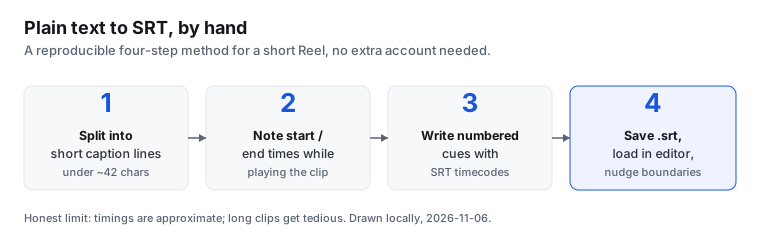
The practical fixes are manual, and they are worth stating plainly because no setting on the page will do them for you. If the Reel is an interview or a two-person exchange, transcribe it, then read the text with the video open and insert a line break at each change of voice. Where the speakers are known, add the name yourself in the copy you are editing. If you control the recording, the cheapest improvement happens at capture time: one microphone per person, or a script where speakers take clearly separated turns, gives any transcription model far less to disentangle than a heated overlapping conversation recorded on a single phone across a table.
For longer conversations, splitting the file into shorter stretches before transcription also helps you keep track of which section holds which exchange. None of this adds a speaker label to the raw output; it makes the raw output easier to annotate afterwards. The distinction matters if you are quoting the result, because a quote needs an attributed speaker and the tool did not supply one. Treat the text as a faithful record of the words and as the starting point for your own editing, not as a finished, attributed interview script.
What to take away
An Instagram transcript is a record of the words, not a cast list. When two people speak, it will give you both sets of words in one block and leave the attribution to you. That is a limitation of the model's design, not a bug in the file you uploaded, and it is exactly the kind of limit worth knowing before you build a workflow on top of the text.